
GTA 6 players report a way to fix graphical changes after update
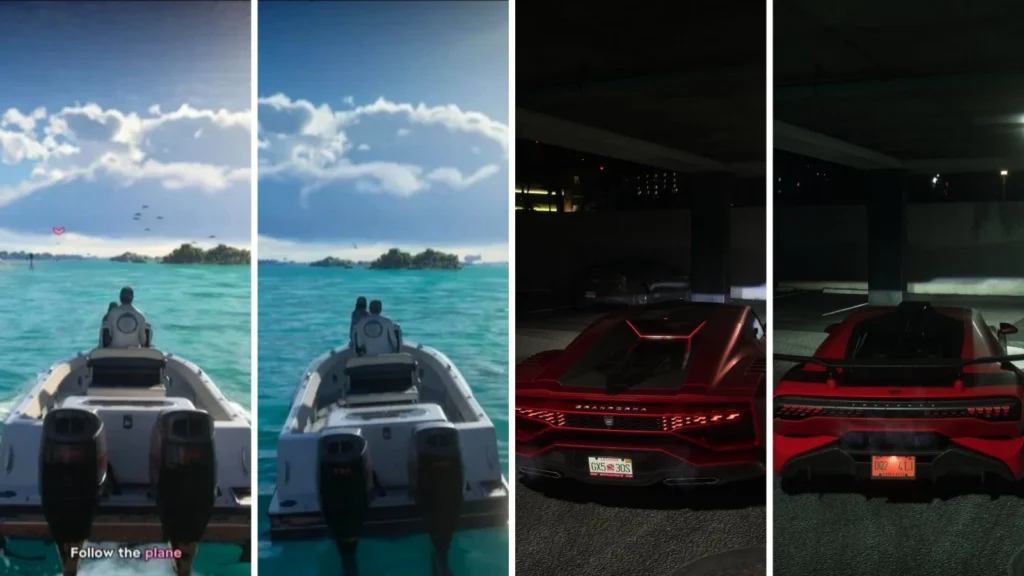
After the release of the first update for GTA 6, launched on November 23, some players on the PlayStation 5 platform reported a degradation in graphical performance. Users noted that after installing the patch, textures, lighting, and the appearance of character hair changed, and rain effects became less clear.
Reported by Dexerto
At the same time, there is no consensus within the community: many players claim that the game’s visual component has remained unchanged compared to the launch. Developer Rockstar Games, in its patch notes for the update, which was aimed at fixing bugs and weather issues, did not indicate any changes to the graphics.
To resolve the issue, some users proposed a sequence of actions involving closing the game completely, turning off HDR, and changing the console resolution to 1080p, followed by restarting the device and reverting the settings to their previous values.
The game looks exactly the same as it did at launch, with full restoration of colors, lighting, shadows, textures, and overall visual quality.
— user post on Reddit
Some players confirmed the effectiveness of this method, while others reported that it had no result. Some commenters suggested that the image quality issues might be related to automatic HDMI port settings on televisions.
Rockstar Games has not yet officially commented on these reports. In 2015, the developer previously acknowledged that an update for GTA 5 caused a temporary degradation of graphics on previous-generation consoles, after which it released a fix.
Translated with AI from the Ukrainian original
Original post
**UPDATE on the GTA 6 graphics downgrade patch**I tried the trick suggested by @RealRockatansky and @alex_de_tampa the game genuinely looks better again. I'm reposting the instructions here for anyone experiencing the same issue:1. Go to your PS5 display settings, turn off…
View on XRead next


Most read
- Configuring speed camera alerts in Android Auto
- Eastern Libya administration to demand compensation from Ukraine for strike on Benghazi port
- russian troops attacked Ukraine with 140 drones on the night of November 29
- High Anti-Corruption Court lifts seizure of eight vehicles in Tetyana Krupa case
- Gukesh and Sindarov draw the fourth game of the World Chess Championship match